How to enable property for record filtering in Endeca - CAS based Indexing?
The Index Configuration modifies index configuration stored in the Endeca Configuration Repository for an application.
index-config.json contains all dimension and property definition including ATG configuration in ECR repository and used for indexing. This file can find out under <<Endeca_App>>/config/index-config folder. This file gets generated during application creation using deployment template.
Find out following steps to make property records filterable :-
1. Add a property in index-config.json under <<Endeca_App>>/config/index-config folder.
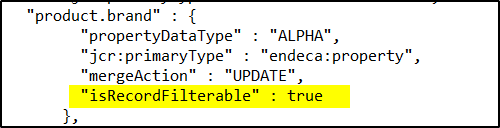
2. Add "isRecordFilterable" property as true. Below example would update product.brand property.
3. Run the following command to update the property in Endeca Configuration repository.
<<Endeca_APP_PATH>>/control->./index_config_cmd.sh set-config -o all|system -f <<File_Path>>/index-config.json.
Note : - By default Index-config.json contains few properties and those are not used in CRS integration. Remove all properties and add the desired properties.
index-config.json contains all dimension and property definition including ATG configuration in ECR repository and used for indexing. This file can find out under <<Endeca_App>>/config/index-config folder. This file gets generated during application creation using deployment template.
Find out following steps to make property records filterable :-
1. Add a property in index-config.json under <<Endeca_App>>/config/index-config folder.
2. Add "isRecordFilterable" property as true. Below example would update product.brand property.
3. Run the following command to update the property in Endeca Configuration repository.
<<Endeca_APP_PATH>>/control->./index_config_cmd.sh set-config -o all|system -f <<File_Path>>/index-config.json.
Note : - By default Index-config.json contains few properties and those are not used in CRS integration. Remove all properties and add the desired properties.
Discussion (0)
Technical questions and architecture discussionsNo comments yet. Have a question about this architecture pattern? Leave a response below.
Join the Discussion