Endeca 11.x : Property 'priority' must be a positive integer
Behaviour :-
Following Exception/Error comes during Endeca experience manager content migration between environments or importing contents from zip file.
Solution :-
Sometimes business user assigns rules priority less than 1 and Endeca XM accepts that value while saving the rule. Above Exception comes if any rule priority is less than 1. Ask business user not to assign rules priority as 0 or any value negative number. Extract the zip file and change the priority in respective JSON file as per error to any positive integer and try importing again.
From Author
Was this post resolve the solution you are looking for? are you looking for some other issues?Provide your comments
Following Exception/Error comes during Endeca experience manager content migration between environments or importing contents from zip file.
| SEVERE: Caught an exception while invoking method 'importApplication' on object 'IFCR'. Releasing locks. java.lang.reflect.InvocationTargetException at sun.reflect.NativeMethodAccessorImpl.invoke0(Native Method) at sun.reflect.NativeMethodAccessorImpl.invoke(NativeMethodAccessorImpl.java:57) at sun.reflect.DelegatingMethodAccessorImpl.invoke(DelegatingMethodAccessorImpl.java:43) at java.lang.reflect.Method.invoke(Method.java:606) at com.endeca.soleng.eac.toolkit.Controller.invokeRequestedMethod(Controller.java:931) at com.endeca.soleng.eac.toolkit.Controller.execute(Controller.java:269) at com.endeca.soleng.eac.toolkit.Controller.main(Controller.java:137) Caused by: com.endeca.soleng.eac.toolkit.utility.IFCRUtility$HttpStatusException: Internal Server Error (500): javax.jcr.RepositoryException: The following 2 validation failures occurred: [/sites/Discover/content/Web/Browse Pages/Boot Page] Property 'priority' must be a positive integer. [/sites/Discover/content/Web/Browse Pages/Helmets Page] Property 'priority' must be a positive integer. at com.endeca.soleng.eac.toolkit.utility.IFCRUtility.execute(IFCRUtility.java:1016) at com.endeca.soleng.eac.toolkit.utility.IFCRUtility.httpPostDoNotConsume(IFCRUtility.java:957) at com.endeca.soleng.eac.toolkit.utility.IFCRUtility.httpPost(IFCRUtility.java:929) at com.endeca.soleng.eac.toolkit.utility.IFCRUtility.importNode(IFCRUtility.java:686) at com.endeca.soleng.eac.toolkit.component.IFCRComponent.importContent(IFCRComponent.java:524) at com.endeca.soleng.eac.toolkit.component.IFCRComponent.importApplication(IFCRComponent.java:427) ... 7 more |
Solution :-
Sometimes business user assigns rules priority less than 1 and Endeca XM accepts that value while saving the rule. Above Exception comes if any rule priority is less than 1. Ask business user not to assign rules priority as 0 or any value negative number. Extract the zip file and change the priority in respective JSON file as per error to any positive integer and try importing again.
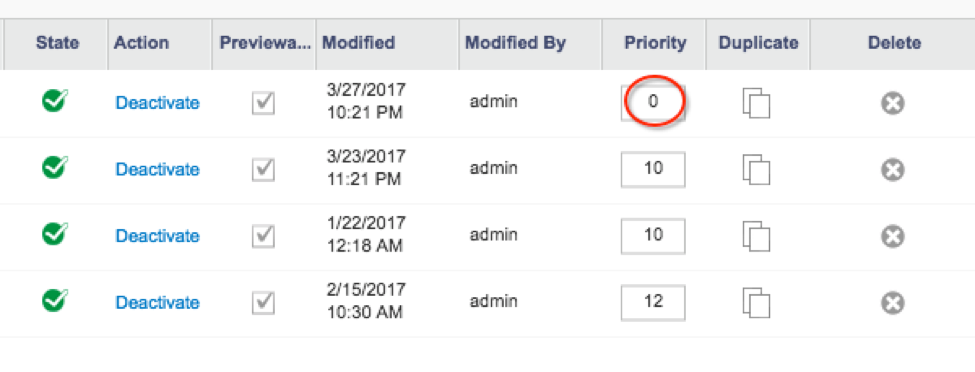 |
From Author
Was this post resolve the solution you are looking for? are you looking for some other issues?Provide your comments
Discussion (2)
Technical questions and architecture discussionsJoin the Discussion