Oracle Endeca 10.x : EndecaHow to prevent 404 error after baseline update due to workbench password change?
Behaviour :-
Web application starts showing 404-page error after baseline update once admin password changed from change password window using Endeca workbench and its not updated WorkbenchConfig.xml.
The following error can be seen in Endeca application logs
Web application starts showing 404-page error after baseline update once admin password changed from change password window using Endeca workbench and its not updated WorkbenchConfig.xml.
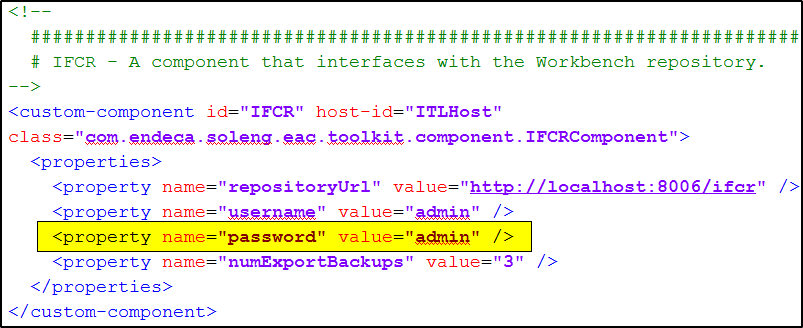 |
| WorkbenchConfig.xml IFCR screenshot |
| INFO: [LiveMDEXHostA] Starting backup utility 'backup_log_dir_for_component_DgraphA1'. Apr 29, 2015 9:53:25 PM com.endeca.soleng.eac.toolkit.component.Component start INFO: [LiveMDEXHostA] Starting component 'DgraphA1'. Apr 29, 2015 9:53:33 PM sun.reflect.NativeMethodAccessorImpl invoke0 INFO: Publishing Workbench 'live' configuration to MDEX 'DgraphA1' Apr 29, 2015 9:53:33 PM com.endeca.soleng.eac.toolkit.component.IFCRComponent pushLiveContentToDgraphById INFO: Pushing live content to dgraph: DgraphA1 Apr 29, 2015 9:53:33 PM com.endeca.soleng.eac.toolkit.script.Script runBeanShellScript SEVERE: Unauthorized (401): Unauthorized access to workbench. Please check your credentials. Occurred while executing line 5 of valid BeanShell script: [[ 2| 3| compId = invokingObject.getElementId(); 4| log.info("Publishing Workbench 'live' configuration to MDEX '" + compId + "'"); 5| IFCR.pushLiveContentToDgraphById(compId); 6| 7| ]] Apr 29, 2015 9:53:33 PM com.endeca.soleng.eac.toolkit.component.ServerComponent runPostStartupScript WARNING: Caught an exception while executing post-startup script for server component 'DgraphA1'. com.endeca.soleng.eac.toolkit.exception.AppControlException: Error executing valid BeanShell script. at com.endeca.soleng.eac.toolkit.script.Script.runBeanShellScript(Script.java:179) at com.endeca.soleng.eac.toolkit.script.Script.run(Script.java:127) at com.endeca.soleng.eac.toolkit.component.ServerComponent.runPostStartupScript(ServerComponent.java:323) at com.endeca.soleng.eac.toolkit.component.ServerComponent.startInParallel(ServerComponent.java:132) at com.endeca.soleng.eac.toolkit.component.cluster.DgraphCluster.applyIndex(DgraphCluster.java:612) at sun.reflect.NativeMethodAccessorImpl.invoke0(Native Method) at sun.reflect.NativeMethodAccessorImpl.invoke(NativeMethodAccessorImpl.java:39) at sun.reflect.DelegatingMethodAccessorImpl.invoke(DelegatingMethodAccessorImpl.java:25) at java.lang.reflect.Method.invoke(Method.java:597) at com.endeca.soleng.eac.toolkit.Controller.invokeRequestedMethod(Controller.java:917) at com.endeca.soleng.eac.toolkit.Controller.execute(Controller.java:255) at com.endeca.soleng.eac.toolkit.Controller.main(Controller.java:134) Caused by: com.endeca.soleng.eac.toolkit.utility.IFCRUtility$HttpStatusException: Unauthorized (401): Unauthorized access to workbench. Please check your credentials. at com.endeca.soleng.eac.toolkit.utility.IFCRUtility.execute(IFCRUtility.java:785) at com.endeca.soleng.eac.toolkit.utility.IFCRUtility.httpPostDoNotConsume(IFCRUtility.java:731) at com.endeca.soleng.eac.toolkit.utility.IFCRUtility.httpPost(IFCRUtility.java:703) at com.endeca.soleng.eac.toolkit.utility.IFCRUtility.httpPost(IFCRUtility.java:654) at com.endeca.soleng.eac.toolkit.utility.IFCRUtility.mdexPublish(IFCRUtility.java:598) at com.endeca.soleng.eac.toolkit.component.IFCRComponent.pushLiveContentToDgraphById(IFCRComponent.java:442) at com.endeca.soleng.eac.toolkit.script.Script.runBeanShellScript(Script.java:165) ... 45 more Apr 29, 2015 9:53:33 PM com.endeca.soleng.eac.toolkit.utility.Utility start INFO: [LiveMDEXHostA] Starting shell utility 'rmdir_dgraph-input-old'. |
Solution:-
This issue comes if Endeca workbench admin password is different than WorkbenchConfig.xml under Endeca_app/config/script file. As per logs, Index generated by Dgidx gets propagated to live Dgraph first than Endeca workbench contents gets published to live Dgraph. So if the password is different than publishing live content method gets failed and logs the error in the log but baseline process does not stop.
The following code as per snapshot can be added to baseline process under Endeca_App/config/script/DataIngest.xml to prevent above issue even password is different.
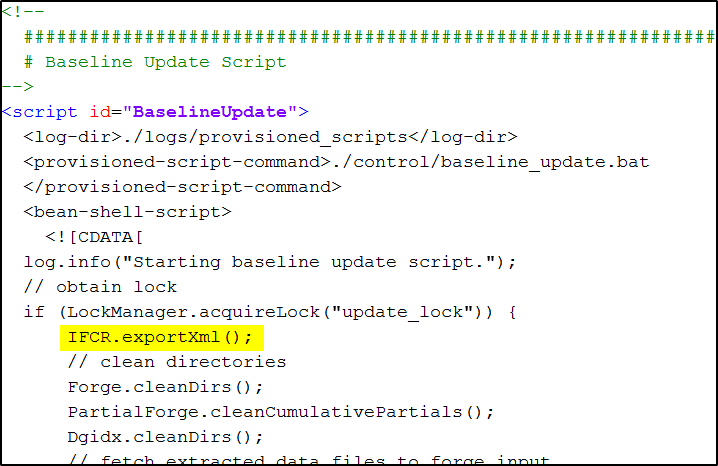
Above code would first try to export site data and verify if workbench password and WorkbenchConfig.xml password both are same or not and export the XML.
Above code would first try to export site data and verify if workbench password and WorkbenchConfig.xml password both are same or not and export the XML.
Note : Delete the generated XML after adding above code.
From Author
Was this post resolve the solution you are looking for? are you looking for some other issues?Provide your comments
Discussion (11)
Technical questions and architecture discussionsJoin the Discussion