Oracle Endeca : what is disabled refinements and how to use?
Definition
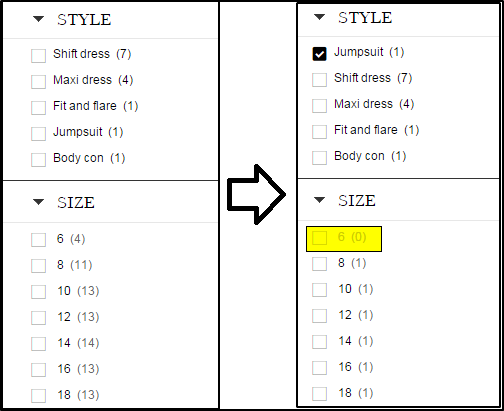
Disabled refinements represent those refinements that do not have any results after end use select refine results using guided navigation.
In many front-end applications, Disabled refinement to display as grayed out to understand what not is available after refinement selection.
Configuring disabled refinements
The MDEX Engine computes the disable refinements that must be returned based on two navigation states
1. The base navigation state. This is Dimension Ne value
2. The default navigation state. Selected navigation state from end user to compare disabled refinement between base and default navigation state.
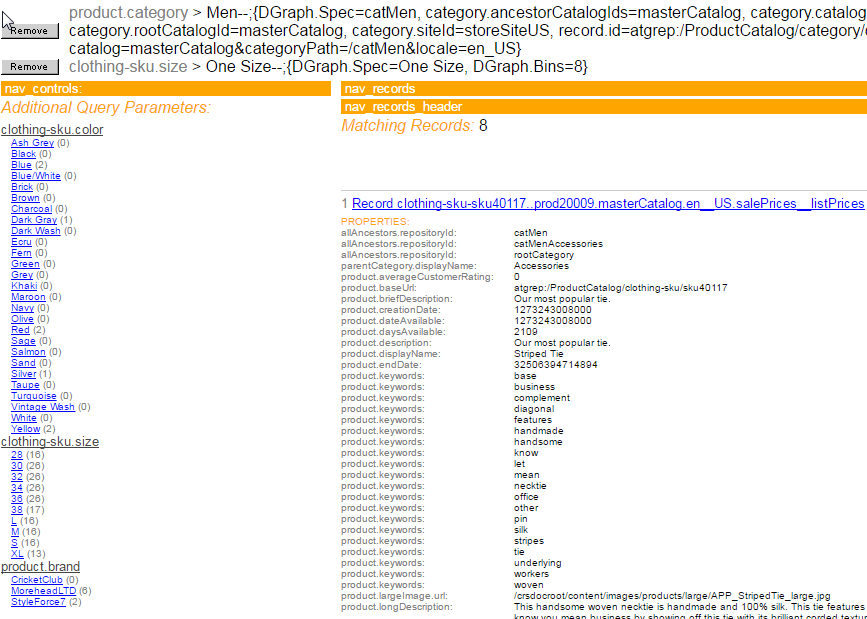
This can be tested in Endeca jspref application by adding following parameters:-
N=134711+135689&Ntk=All&Ntt=television&Ndr=basedimid+100000+textsearchesinbase+true+eqlfilterinbase+false+rangefiltersinbase+false
Find out screenshot below from jspref:
Following java code provides results of disabled refinements:-
DisabledRefinementsConfig disbaledRefinement= new DisabledRefinementsConfig();
disbaledRefinement.setTextSearchesInBase(true);
// Include navigation selections from the dimension with ID 100000 (Value of Ne parameter)in base navigation state
disbaledRefinement.setDimensionInBase(100000, true);
query.setNavDisabledRefinementsConfig(disbaledRefinement);
Limitation :-
1. Disabled refinements are not returned for hierarchical dimensions.
2. Dynamic ranking is not supported.
Note:- This feature is not available in Oracle Endeca assembler integration OOTB and defects has already been raised to Oracle and they are working on it. If you still need this feature than below class needs to be customized
com.endeca.infront.navigation.request.support.NavigationRequest.
Discussion (1)
Technical questions and architecture discussionsJoin the Discussion