Endeca all versions : Special character in search term
Endeca uses only alphanumeric characters to be searchable by default as part of Endeca search query.
Behavior:
If any search term contains any special characters, Endeca replaces special characters by "space" and make Endeca query. This may not give intended results.
Example: If a search term is T-Shirts, Endeca internally replaces with space so searchable terms would be "T Shirt". Search using internally updated search term by Endeca would not give desired results.
Solution :
For Forge-based Application
1. Open <<Endeca_App_Path>>/config/pipeline/<<app_name>>.search_chars.xml.
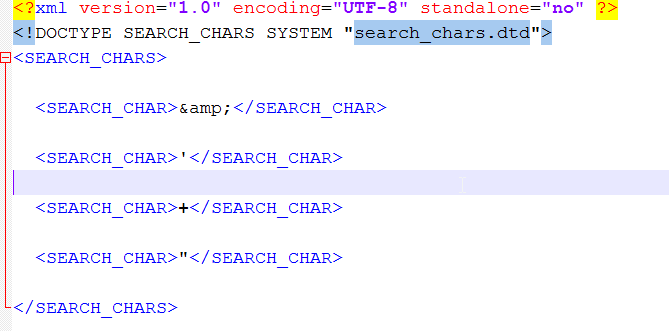
2. Add all characters that you want to make searchable.
3. Run baseline.
For CAS based Application
1. Open <<Endeca_App_Path>>/config/mdex/<<app_name>>.search_chars.xml.
2. Add all characters that you want to make searchable.
3. Run baseline.
Find out the screen shot below.
Discussion (0)
Technical questions and architecture discussionsNo comments yet. Have a question about this architecture pattern? Leave a response below.
Join the Discussion